



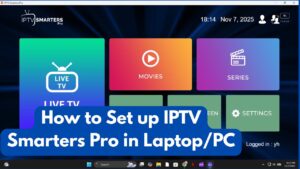
How to Watch IPTV on PC 2026: Step-by-Step IPTV Smarters Pro Guide
Are you looking for the ultimate way to stream your favorite live sports, blockbuster movies, and trending TV shows directly from your desktop or laptop? While Smart TVs are incredibly popular, watching IPTV on a PC remains the top choice for professionals, students, and expats who demand high flexibility and pixel-perfect resolution.
IPTV Smarters Pro isn’t just a standard media player; it is the most stable and powerful tool for rendering 4K and 8K streaming qualities on Windows operating systems. In this exclusive guide from Air Entertainment, we will show you exactly how to transform your computer into a premium global entertainment hub using the direct download link and the best configuration settings for buffer-free viewing.
Why is IPTV Smarters Pro the Best Choice for PC?
Before we dive into the installation process, it’s essential to understand why we highly recommend this specific software for our AirTV server users:
- Professional User Interface: The app features a smart, categorized layout for Live TV, Movies (VOD), and Series, giving you an experience that rivals top-tier global streaming platforms.
- Multi-Quality Support: The software efficiently handles raw, uncompressed broadcast files, delivering genuine 4K quality if your subscription supports it.
- Powerful Playback Engine: Smarters Pro is optimized to utilize your computer’s GPU (Graphics Processing Unit), reducing the load on your CPU and entirely eliminating stutter or lag.
- Effortless Setup: It fully supports the Xtream Codes API feature, which is the fastest and easiest way to connect your subscription without dealing with long, complicated M3U URLs.
Step 1: Download and Install IPTV Smarters Pro for Windows
We have provided the original, stable version of the software to ensure 100% compatibility with our high-speed servers.
- Direct Download Link: Click here to download IPTV Smarters Pro V2.4 for PC
Installation Steps:
- Once the file is downloaded from the link above, open the
.exefile to begin the setup. - Follow the on-screen instructions by clicking Next and then Install.
- Upon completion, the IPTV Smarters Pro icon will appear on your desktop. Double-click it to open the application.
Step 2: How to Activate Your AirTV Subscription
When you launch the app, you will be prompted to choose a login method. The most stable and recommended method is “Login with Xtream Codes API”. Follow these simple steps:
- Any Name: Type a recognizable name (e.g., AirTV 4K).
- Username: Enter your subscription username (provided to you by our team via WhatsApp).
- Password: Enter your secure password.
- URL (Host): Input the server URL we provided (ensure you type it exactly as received, including the port number).
- Click on ADD USER.
Wait a few seconds for the application to download the live channels and VOD library. Congratulations! You have successfully set up your PC for endless IPTV streaming.
Pro Tips for Buffer-Free 4K Streaming on PC
To get a premium viewing experience that matches the Air Entertainment brand standards, especially when watching major live sports events or cinematic releases, we recommend the following:
- Wired Connection: Always prefer an Ethernet (LAN) cable over Wi-Fi to guarantee speed stability and prevent packet loss.
- Update Graphics Drivers: Ensure your PC’s GPU drivers are updated to the latest version so it can smoothly process 4K HDR video formats.
- Use a VPN: If you experience ISP throttling or geo-blocking in your country, using a reliable VPN can help bypass these restrictions and speed up server communication.
Get Your Premium AirTV Subscription Today
At Air Entertainment, we don’t just sell subscriptions; we provide a complete technical support service to help you configure the software on any device at any time.
- Sales & Tech Support (WhatsApp): +447403694155
- Telegram Channel: t.me/Airtv8k
Conclusion: Running IPTV on your PC has never been easier thanks to IPTV Smarters Pro. Don’t settle for average streaming quality. Claim your free trial today from AirTV and unlock a world of limitless entertainment right from your desk!