



The Ultimate Guide: How to Install IPTV on Firestick in 2026
Cutting the cord has never been easier. If you own an Amazon Fire TV Stick, you already have one of the most powerful streaming devices in your hands. But to unlock its true potential and access global live sports, blockbuster movies, and premium networks, you need to know how to install the best IPTV subscription.
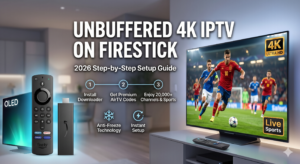
In this comprehensive guide, we will walk you through the exact steps to install IPTV on your Firestick in less than 5 minutes. Get ready to transform your living room into a 4K home theater.
Why is Firestick the Best Device for IPTV?
The Amazon Firestick is wildly popular in the US, Canada, and the UK for a good reason. It’s affordable, portable, and runs on an Android-based system, which means it supports the absolute best IPTV players like TiviMate, IBO Player, and IPTV Smarters Pro. When paired with a premium service, it easily handles 4K UHD streaming without breaking a sweat.
Step 1: Prepare Your Firestick (Enable Unknown Sources)
Before downloading any IPTV player, you need to allow your Firestick to install third-party apps. Don’t worry; this is completely safe.
- Go to your Firestick Home Screen and click the Settings gear icon.
- Select My Fire TV.
- Click on Developer Options. (Note: If you don’t see Developer Options, click on ‘About’, then click ‘Fire TV Stick’ 7 times to unlock it).
- Turn ON Apps from Unknown Sources.
Step 2: Install the ‘Downloader’ App
Since premium IPTV players are not always available on the official Amazon App Store, we use an app called “Downloader” to get them.
- Go back to the Home Screen and select the Find/Search icon.
- Type Downloader and install the app with the orange icon.
- Open the Downloader app and click Allow when it asks for permissions.
Step 3: Install the Best IPTV Player
Now it’s time to install the media player. While there are many options, we highly recommend TiviMate or IBO Player for the best 4K experience and fastest channel zapping.
- Open the Downloader app.
- Click on the URL bar and enter the APK code for your preferred player:
- For TiviMate: Enter
278077and click Go. - For IBO Player: Enter
834339and click Go.
- For TiviMate: Enter
- Wait for the file to download, then click Install.
- Once installed, click Done and delete the installation file to save space on your Firestick.
Step 4: Enter Your Premium IPTV Credentials
Opening the app is just the beginning. The app itself is an empty shell; it needs a powerful engine to run. This is where AirTV comes in.
To activate your app, you will need your M3U Link or Xtream Codes API (Username, Password, and Server URL).
Why AirTV is the Best IPTV Subscription for Firestick:
If you are tired of buffering during the NBA playoffs, Champions League finals, or the highly anticipated 2026 World Cup, AirTV is your ultimate solution.
- Anti-Freeze Technology 9.0: Our private servers guarantee 99.9% uptime, especially during peak sports events.
- True 4K UHD Quality: Experience sports and cinema exactly as the directors intended.
- Massive Library: Access over 20,000+ Live Channels and an updated VOD library with 50,000+ Movies and TV Shows.
- 24/7 Human Support: Our expert team is always available to help you set up your device.
Ready to Experience Zero Buffering?
Don’t miss another game or pay for overpriced cable bundles. You now know how to install IPTV on Firestick—the only thing missing is a rock-solid server.
[Click Here to Contact Us on WhatsApp and Get Your Instant Free Trial!]